Mail Workflow configuration
Hi everyone,
I've decided to write this quick post about the complete email workflow to clarify the process, which in Emacs can be complex and quite varied at times.
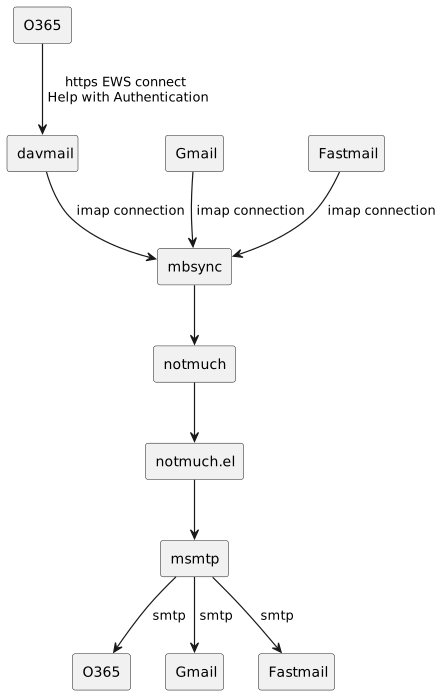
A preliminary diagram to show what we're going to talk about:
Retrieving emails
I mainly use 3 email accounts:
| Usage | Provider |
|---|---|
| Work | O365 |
| Personal | fastmail |
| Personal | gmail |
O365
This setup is the most complicated one, because Microsoft and companies don't make it easy. The most complex part is authentication, in my case two-factor authentication.
The most important thing is to understand what limitations your company imposes on mail access.
In my case, they currently allow connection via HTTPS through EWS. To synchronize, I use software that supports two-factor authentication and acts as a bridge between EWS and IMAP. This application is davmail. You can download it from Download davmail.
mbsync connects to Davmail via IMAP to fetch the emails.
Fastmail and Gmail
These accounts are synced directly with mbsync, which connects to Gmail's IMAP, and to fastmail.com via an app-specific password. You can check Fastmail's info here: Server name and ports. They have a page with lots of configuration details.
mbsync configuration
My work mailbox is about 4GB in size. It has folders where I manually archive email, and a group of folders with automatic archiving that I don’t want to sync. Full sync takes a while, so I’ve developed a different strategy:
- Define fast-sync folders
- Do a full sync only once per hour
This allows me to stay updated with high-traffic folders, and review the others less frequently.
Here’s how I configure it:
IMAPAccount company
Host 127.0.0.1
Port 1143
Timeout 300
SSLType none
AuthMechs LOGIN
User "user@es.company.com"
CertificateFile /etc/ssl/certs/ca-certificates.crt
PassCmd "PASSWORD_STORE_DIR=/home/user/password-store pass es.company.com/user"
PipelineDepth 1

IMAPStore company-remote
Account company

MaildirStore company-local
Path ~/maildir/company.com/
Inbox ~/maildir/company.com/inbox
SubFolders Verbatim

Channel company-inbox
Far :company-remote:
Near :company-local:
Patterns  "INBOX"
Create Both
Expunge Both
CopyArrivalDate yes
SyncState *

Channel company-projects
Far :company-remote:
Near :company-local:
Patterns  "INBOX/1_PROJECTS/*"
Create Both
Expunge Both
CopyArrivalDate yes
SyncState *

Channel company-areas
Far :company-remote:
Near :company-local:
Patterns  "INBOX/2_AREAS/*"
Create Both
Expunge Both
CopyArrivalDate yes
SyncState *

Channel company-resources
Far :company-remote:
Near :company-local:
Patterns "INBOX/3_RESOURCES/*"
Create Both
Expunge Both
CopyArrivalDate yes
SyncState *


Channel company-archives
Far :company-remote:
Near :company-local:
Patterns  "INBOX/4_ARCHIVES/*"
Create Both
Expunge Both
CopyArrivalDate yes
SyncState *

Channel company-sent
Far :company-remote:Sent
Near ":company-local:Elementos\ enviados"
Create Both
Expunge Both
CopyArrivalDate yes
SyncState *

Channel company-trash
Far :company-remote:Trash
Near ":company-local:Elementos\ eliminados"
Create Both
Expunge Both
CopyArrivalDate yes
SyncState *

Channel company-drafts
Far :company-remote:Drafts
Near :company-local:Borradores
Create Both
Expunge Both
CopyArrivalDate yes
SyncState *

Channel company-unsent
Far ":company-remote:Unsent Messages"
Near ":company-local:Bandeja\ de\ salida"
Create Both
Expunge Both
CopyArrivalDate yes
SyncState *

# Group of folders that sync every 10 min.
Group company
Channel company-inbox
Channel company-sent
Channel company-trash
Channel company-drafts
Channel company-unsent

# Group of folder that sync every hour
Group company-other
Channel company-projects
Channel company-areas
Channel company-resources
Channel company-archives

# =============================
# All folders sync at the same time
IMAPAccount gmail
Host imap.gmail.com
User "user@gmail.com"
Port 993
SSLType IMAPS
AuthMechs LOGIN
PassCmd "PASSWORD_STORE_DIR=/home/user/password-store pass gmail.com/user"

IMAPStore gmail-remote
Account gmail

MaildirStore gmail-local
SubFolders Verbatim
Path ~/maildir/gmail.com/
Inbox ~/maildir/gmail.com/inbox

Channel gmail
Far :gmail-remote:
Near :gmail-local:
Patterns * !"[Gmail]/All Mail" !"[Gmail]/Important" !"[Gmail]/Starred" !"[Gmail]/Spam" !"Notes"
Create Near
Sync All
Expunge Both
SyncState *

# ==============================
# All folders sync at the same time
IMAPAccount fastmail
Host imap.fastmail.com
User "user@fastmail.com"
Pass "XXXXXXXXXXXXX"
Port 993
SSLType IMAPS
AuthMechs LOGIN

IMAPStore fastmail-remote
Account fastmail

MaildirStore fastmail-local
SubFolders Verbatim
Path ~/maildir/fastmail.com/
Inbox ~/maildir/fastmail.com/inbox

Channel fastmail-inbox
Far :fastmail-remote:
Near :fastmail-local:
Patterns "INBOX" "Notes" "Memos"
CopyArrivalDate yes
Create Both
Expunge Both
SyncState *

Channel fastmail-others
Far :fastmail-remote:
Near :fastmail-local:
Patterns  "INBOX/*" "Notes/*" "Memos/*"
Create Both
Expunge Both
CopyArrivalDate yes
SyncState *

Group fastmail
Channel fastmail-others
Channel fastmail-inbox
Synchronization and tagging
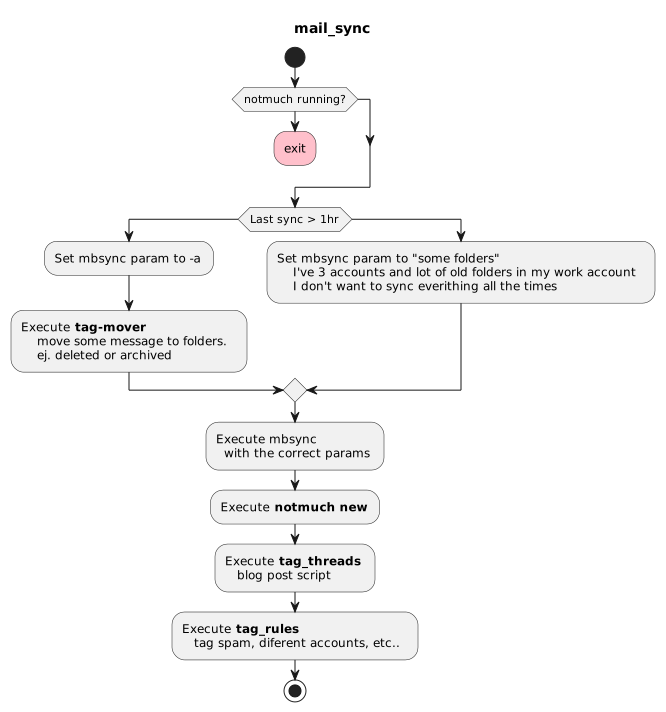
To run the tagging and sync workflow, I use crontab. I have a script called mail_sync scheduled every 10 minutes, which does all the work.
Here’s a diagram of how it works, and you can find the scripts in configuration files.
About tagging
All mail configuration is stored in an org-mode file where I keep the script code. This file also includes some tables that get converted into notmuch commands to manage spam or move emails.
A table like this:
| noreply@medium.com |
| info@ofertasprive.com |
| @creativemarket.com |
Generates, using the following code, a script with instructions to mark spam for deletion.
(let((command "notmuch tag +archived +trashed -inbox  -unread -- tag:gmail AND not tag:trashed AND"))
  (concat command (mapconcat (lambda (en) (format " from:%s" (car en))) emails)))
These are the lines inside the tag-rules script:
# *******************************************
#    Elisp generated code
# *******************************************

# *******************************************
#    End elisp generated code
# *******************************************
About moving emails
All mail is stored in the maildir folder, with a subfolder for each account: company.com, gmail.com, fastmail.com. These are synced with mbsync.
I also have 3 other folders outside of sync to archive emails for each account: archive_company.com, archive_gmail.com, archive_fastmail.com. This frees up the online inboxes.
The reason for the naming is that it helps with moving emails, since I maintain the original folder structure.
The scripts that move the mail files are a bit special. The move isn't just for archived emails. In my work account, I need to move them to folders within the mailbox, and to do this correctly, the file name has to be modified. If not, mbsync gets confused. The format is as follows:
1764049809.5009_3.void-slimx,U=70145:2,
This maildir format is what mbsync uses. If you want to move a message, you must remove the U=70145 from the new name.
This is what the safe-move and safe-move-arch scripts do. They could probably be unified, but I’ve kept them separate since the beginning and haven’t revisited them.
I think the most important things are documented here, but if I’ve missed anything or you need more info, you know where to find me. I've a bunch of elisp functions in the notmuch configuration to manage the tagging in Emacs, if you're interested let me know.